
Scavenger hunt alarm
The barcode alarm that picks a different item every morning
A barcode alarm only stops when you scan something away from your bed. WakeUpBroo fixes the one way that idea usually fails: instead of one barcode you can keep on the nightstand, it picks one of several items around your home at random — and you don't know which until the alarm rings.
The appeal of a barcode alarm is simple. A normal alarm dies with one tap from bed; a barcode alarm makes you stand up, walk somewhere and point your camera at a specific code. For heavy sleepers that walk is what actually ends the sleep — far more than a louder sound.
The problem is what happens after a week. With one barcode, the shortcut is obvious: bring the shampoo bottle back to the bedroom, or photograph the barcode and keep the picture by the bed. A half-asleep brain finds that shortcut fast, and the alarm turns back into a one-tap alarm with extra steps.
How the random-item barcode alarm works
Save 3–8 items
Scan the barcodes on things around your home and name them. Spread them across rooms — none in the bedroom.
It picks one at random
When the alarm rings, WakeUpBroo names one item — never the same one twice in a row. Reopening the app won't change it.
Find it and scan it
Only that item's barcode stops the alarm. By the time you've found the coffee bag, you're up.
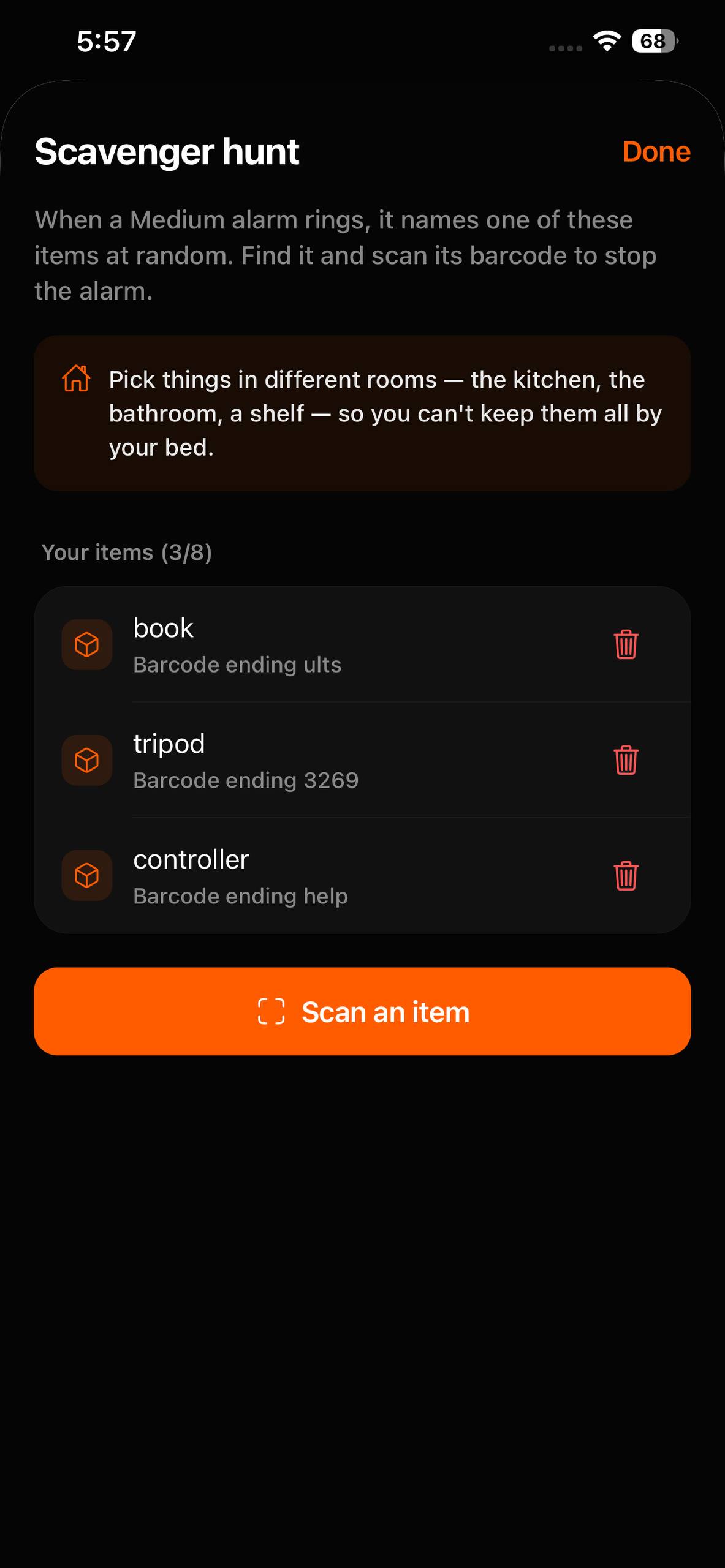
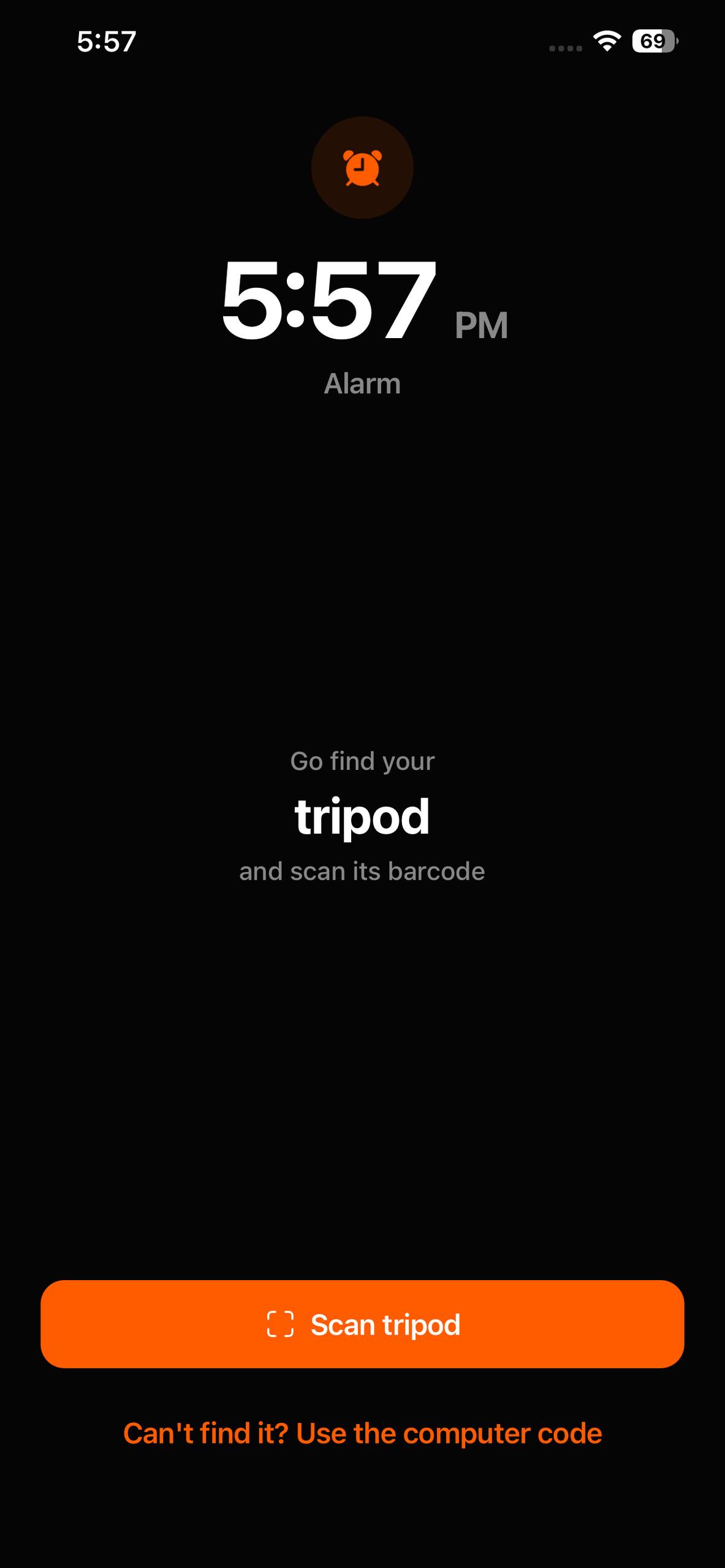
Any product barcode or QR code works — cereal, toothpaste, shampoo, coffee, a book, a medicine box. You scan each one once to save it and give it a name, so when the alarm rings it tells you which item to find — the coffee bag, say — rather than showing you a code.
Why one random item beats one fixed barcode
- You can't keep it by the bed. With five items spread across the house, you'd have to keep all five on the nightstand to cheat — at which point you've noticed what you're doing.
- A photo of yesterday's barcode doesn't help. It never picks the same item twice in a row, so last night's screenshot is the one barcode guaranteed not to work.
- No rerolling. Once an alarm has picked its item, closing and reopening the app won't swap it for something closer.
- Searching wakes you up. Remembering where the toothpaste is, walking there, finding the barcode — that's more thinking than a sleepy brain can do on autopilot.
Where to put your items
Spread them out, and keep every one of them out of the bedroom. A good set of five: toothpaste by the bathroom sink, the coffee bag in the kitchen, a cereal box in the cupboard, a book on the hallway shelf, shampoo in the shower. Wherever the alarm sends you, you end up somewhere your morning can start — the sink, the kettle, the front of the house.
If you genuinely can't find the item, there's a way out: switch to the computer code and type the code from wakeupbroo.com/code on a laptop instead. It's not a shortcut — it's the hardest mode in the app.
One of three ways to stop the alarm
The barcode hunt is WakeUpBroo's Medium mode. You choose the mode per alarm:
- Easy: five words appear for ten seconds; type them back in order. Good for lighter sleepers who just need their brain switched on.
- Medium: the random-item barcode hunt on this page. Needs only your iPhone.
- Hard: walk to a laptop or computer and type the rotating code from wakeupbroo.com/code, or scan its QR — more on that in the QR code alarm guide.
None of them has a snooze button. If you slide the iPhone's alarm alert away instead of finishing the task, it rings again a minute later. For the wider comparison with mission alarms like Alarmy, see the best alarm apps for heavy sleepers.
FAQ
Frequently asked questions
What is a barcode alarm app?
An alarm that only stops when you scan a barcode with your phone's camera. You put the barcode somewhere away from bed, so turning the alarm off means getting up and walking to it.
How is WakeUpBroo's barcode alarm different?
Most barcode alarms use one barcode, every morning. WakeUpBroo has you save between 3 and 8 items, and each time the alarm rings it picks one of them at random — never the same item twice in a row. There's no single barcode you can keep by the bed or photograph the night before.
What barcodes can I use?
Any product barcode or QR code: cereal boxes, toothpaste, shampoo, coffee, a book, a medicine box. You scan each item once to save it and give it a name, like 'toothpaste' or 'coffee bag'.
Can I reopen the app to get an easier item?
No. Once the alarm has picked an item, the pick is locked for that alarm, so closing and reopening the app won't change it to something closer.
What if I can't find the item?
There's a fallback: switch to the computer code and type the code from wakeupbroo.com/code on a laptop or computer instead. It's harder, not easier — which is the point.
Is there a snooze?
No. There's no snooze in any of WakeUpBroo's modes. If you slide the iPhone's alarm alert away, it rings again a minute later.
Do I need a computer for the barcode mode?
No — the barcode mode only needs your iPhone and the items you saved. The computer is only needed for Hard mode, the code from wakeupbroo.com/code.
Is WakeUpBroo free?
It's free to download with a 3-day free trial. After that, a Pro subscription is needed to set alarms.
Recommended next
Keep reading
A different barcode every morning
Save a few things around your home. When the alarm rings, WakeUpBroo picks one — and only that barcode stops it. Free to download, 3-day free trial.
Free to download on iPhone · Android in development